Add TRADIES HQ to your Home Screen
Open it like an app from your phone.
Built for tradies on the move

Your AI workmate for the trades.
From first job to final approval.

A practical AI workmate plus a field-job record, built for Australian trades. Plan the work, capture time and evidence, send a branded docket, and review contractor reports, quotes and maintenance records in one place.

GPS start & finish Time on site Photo evidence

See the job, not a software demo

What TRADIES HQ looks like in the real world

Practical AI guidance plus a field-job record, built for Australian trades. Describe the job, capture the evidence or upload the paperwork you need reviewed. TRADIES HQ turns that input into a useful next step.

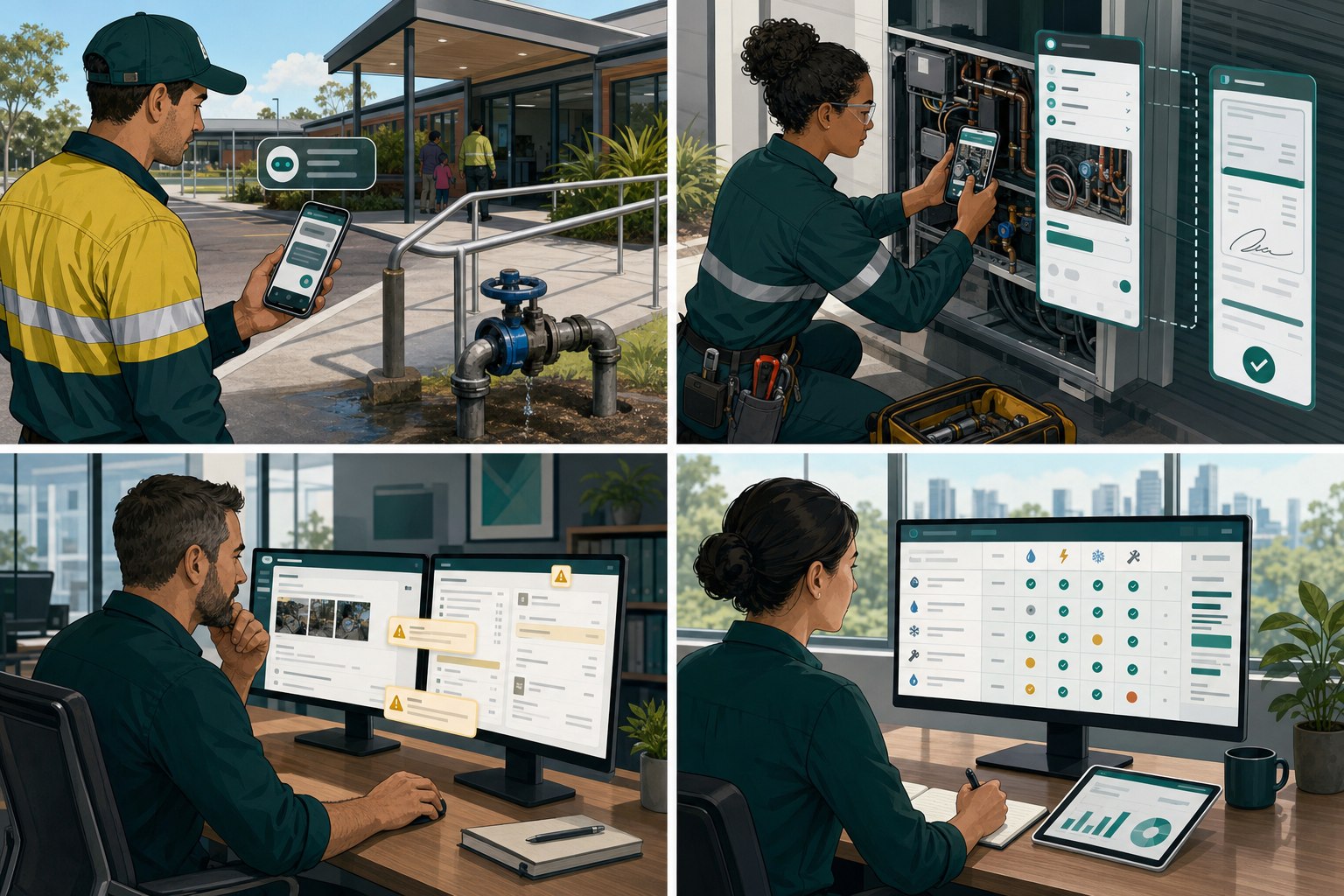
Maintenance tradie inspecting a leaking valve and loose handrail with a TRADIES HQ phone assistant.
For tradies

Arrive, assess and plan the next move

Use TRADIES HQ as a trade-aware second brain when the customer can describe the problem but the job still needs a logical plan.

1 · Record the problem

Capture the trade, asset, symptoms, site conditions and what the customer has noticed.

2 · Ask TRADIES HQ

“What should I check first, what evidence should I capture and what belongs in the scope?”

3 · Plan the work

Get a practical sequence without inventing facts or jumping straight to replacement.

Trade AssistantKnowledge BaseParts Finder
Tradie photographing equipment and preparing a digital field-job service docket.
For tradies

Run the job and send the record

Keep the time, location, work notes, photos and costs together while the job is happening.

1 · Start the job

Pin the start time and location, then select the customer, site and work type.

2 · Capture the work

Add photos, measurements, parts, costs and voice notes as you go.

3 · Close it out

Pin the finish, calculate the job and send a branded customer-ready docket.

Field JobsReport on the RunService History
Supervisor reviewing a contractor service report and repair quote with evidence warnings highlighted.
For supervisors

Review the report or quote before approving

Challenge contractor paperwork, surface gaps and make the next action obvious.

1 · Add the evidence

Upload the report, photos, measurements, scope or supplier quotation.

2 · Run the review

Check diagnosis, evidence, scope, labour, materials, omissions and risk.

3 · Decide clearly

Approve, approve with conditions, or request the missing evidence and revised scope.

Service Report ReviewQuote ReviewChallenge the Tradesman
Facilities manager comparing multi-trade assets, contract tasks and service history in an evidence matrix.
For facilities teams

See the maintenance story across every trade

Bring contracts, asset lists and completed records together so repeat faults and evidence gaps are easier to see.

1 · Add the source files

Upload the scope, asset register and completed records from the relevant trades.

2 · Match work to evidence

See what is supported, unclear, repeated or missing from the records supplied.

3 · Keep the trail

Use the history and gaps to guide the next job, approval or contractor discussion.

Contract ComplianceService HistoryKnowledge Base
TRADIES HQ supports qualified trade decisions. Always follow safe isolation, site procedures, manufacturer instructions and applicable requirements.

The field job basics, without the heavy system

TRADIES HQ is deliberately focused on recording the work clearly rather than trying to run your entire business.

Start & pin location

Record the job start time and a fresh phone GPS location when work begins.

Ongoing works

The job stays live while you work. Reopen it later and the elapsed time is still based on the saved start time.

Photos & work notes

Capture what was done, what was found and the photos that back up the job record.

Customer rates & totals

Use different internal hourly rates by customer, add parts and make a final adjustment before sending.

Branded job cards

Finish and pin location, calculate the job, then create a customer-ready PDF service docket.

Email routing

Send the customer copy and route internal copies to your own report or docket inboxes.

Trade Assistant

Get practical help with job planning, scopes, troubleshooting and safety or compliance questions.

Regular customers

Save customer names and standard hourly rates so repeat jobs are quicker to start.

See it before you sign up

Illustrative examples of the reviews, agent answers and field reports TRADIES HQ can generate — no signup needed to preview how each tool works.

TRADIES HQ — Service Report Review
Service Report Review
Community Centre — leaking pump replacement
APPROVE WITH CONDITIONS
Technical confidence
78%High
Commercial risk
MEDIUM
2 items flagged
  • Diagnosis is supported by the recorded leak location, isolation check and pump condition observations.
  • No product identification photo — request model and serial before ordering the replacement.
  • Commissioning and final leak check are not described — clarify before approval.
AI summary: The recommendation is plausible, but the evidence and handover scope need clarification before approval.

Example outputs for illustration. Your reviews are powered by your job evidence, company rules and the source-priority reasoning engine — “AI reasons. Evidence supports.”

Get more from our AI agents

TRADIES HQ has trade-aware assistants for fault finding, scope building and compliance. Better prompts get better answers — here’s how to talk to them like a pro.

Name the trade, asset and actual symptoms 'It's just not working'
Give measurements or observations you actually took Guess at readings
Upload a clear product or job photo when useful Assume the AI can see missing details
Ask one focused question at a time Bundle unrelated jobs into one
Try a prompt like
Carpentry: this external door keeps binding after rain — what should I check before replacing it?
Plumbing: review this pump replacement quote and tell me what evidence is still missing.
Electrical: build a scope for a switchboard inspection and planned shutdown without inventing test requirements.
HVAC&R: the unit is tripping on high pressure — help me organise the evidence and fault-finding questions.

Need a hand?

Stuck on a prompt, unsure which plan to pick, or have a question about a review? Contact TRADIES HQ for product, billing or review feedback.

  • Prompt & agent guidance
  • Billing & subscription questions
  • Feedback on a review result
Contact the admin team

For job or technical questions, use the Trade Assistant. For account support, contact us directly.

Built for the Australian trade industry

From carpentry and maintenance to plumbing, electrical, HVAC&R and landscaping — TRADIES HQ adapts to the job instead of assuming one trade. Labour, materials, rectification, photos, service reports and after-hours callouts, the way trade businesses actually work.

Field-first
Built for techs on the tools
Australia-wide
Parts sourcing & suppliers
Community
Show your work, get help
Marketplace
Promos & industry events

Community & Marketplace

Share photos of your work, talk shop with other techs, and get a second opinion from the crowd. Browse featured tools, supplier BBQs and industry events — or list your own.

  • Optional supplier and industry listings
  • Show Your Work, Field Help & industry news
  • Supplier directory across Australia

One simple price

All TRADIES HQ field tools are included. No tiers and no feature lockouts once subscribed.

TRADIES HQ monthly

Everything in the app

Built for small trade businesses and sole traders.

$14.95AUD / month

30-day free trial on your first subscription.

  • Field Jobs with GPS start & finish
  • Live time-on-site tracking
  • Work notes, photos, parts & additional works
  • Customer-specific labour rates
  • Branded service dockets and PDFs
  • Report on the Run with photo evidence
  • Email routing to your own inboxes
  • Trade Assistant
Start 30-day trial

Monthly subscription. Cancel through Stripe billing management.

A cleaner record of every job

Start on site, capture the evidence, finish the job and send the customer record without dragging a full job-management system around.

Start 30-day trial